Meet AnchOps — your AI scheduling manager
Keeping your restaurant staffed shouldn't be your second job
It drafts, fills, and publishes your schedule — you decide how much to hand over.
A schedule is only half the job — AnchOps makes sure it actually gets worked. It knows who shows up, because it scores every shift. When someone calls off, it finds cover before you've noticed. And yes, it drafts, fills, and publishes next week on its own. The 4pm no-show shuffle, the “who can I even text?” panic — handled. It's like having an assistant manager fully dedicated to keeping your location staffed.
Flat $59.99 per location. Unlimited employees, no per-seat math — less than one call-off you cover yourself.
15-day free trial · No credit card · 10-minute setup · Cancel anytime
Your data stays yours — hosted on AWS, encrypted, never sold. If you connect your POS, we only read what we need. Security · Privacy
The staffing grind, every single week
- —It’s Sunday night and you’re building the schedule. Again.
- —An open shift sits unfilled while you text six people, one at a time
- —Someone calls off at 4pm and you’re guessing who’ll actually say yes
- —You publish the week, then availability changes blow it up
- —You find out someone’s a no-show problem only after they burn you on a Friday
- —The schedule needs you every single week — whether you’re on vacation or not
A schedule is useless if it isn't hit. AnchOps runs the whole loop — and makes sure it holds.
The attendance engine
The schedule that actually holds
You know who your rocks are — until your gut is wrong on a Friday night. AnchOps turns every scheduled shift into a fact: on time, late, covered, or no-show. Those facts become each employee's Show-Up Score — their reliability rating, broken down by day of the week.
- The scheduler favors proven-reliable people for the shifts that matter
- Open shifts are offered to your most reliable people first
- Employees see their own Show-Up Score — top scorers earn Anchor status and first pick of open shifts
- New hires start neutral; the score is built on facts, not vibes
On-time %, completed shifts, call-outs and no-shows — scored from every scheduled shift, weighted to the last 90 days.
84% fewer no-shows
Measured at Pizza Harbour — the restaurant AnchOps was built in — in the six weeks after Show-Up Scores reached employees' phones. September 2026: zero no-shows across 99 scheduled shifts.
And when someone doesn't show anyway
5:03
Shift started, no punch-in. AnchOps notices.
5:05
It checks in with the employee directly.
5:08
Ranked cover offers go out — most reliable first.
5:16
“Covered — Maria took the 5–9.” Nothing for you to approve.
The autonomous scheduler
A schedule that builds, fills, and publishes itself
AnchOps drafts next week from your history and your team's availability. When a shift is still open, it doesn't wait for you — it messages the qualified people directly: “Can you work Friday 5–10?” First yes fills the shift. When the week is ready, you publish with one tap — or let AnchOps publish it on its own and only bring you the weeks that genuinely need a human call.
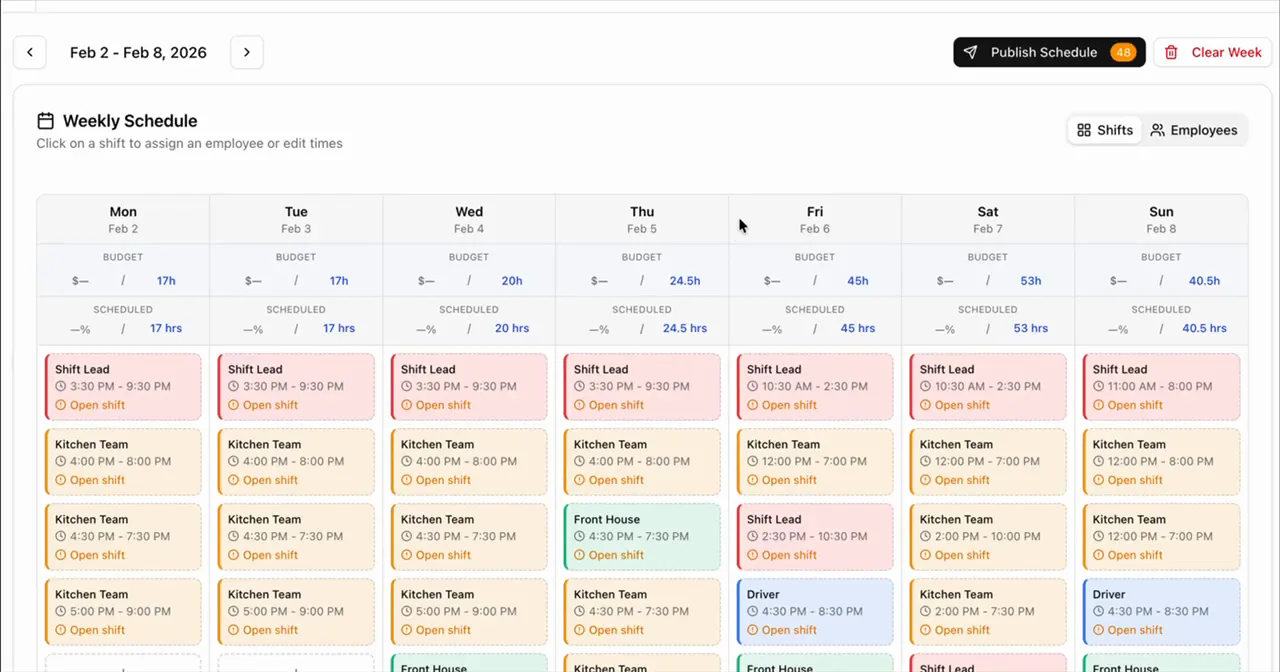
The actual scheduler: a drafted week with each day's scheduled hours against your labor budget, before anything publishes.
You decide how much to hand over — and dial it up as trust builds
- Drafts each week from your sales history and team availability
- Messages qualified employees to fill open shifts — no group texts
- One-tap publish approval on your phone, with labor projections
- Fully autonomous mode: clean weeks publish without you
Coverage without the chaos
AnchOps talks to your team so you don't have to
Every employee gets the free AnchOps app on their own phone — iOS or Android — with a direct line to AnchOps. It reaches out when something needs them, and answers when they need something.
And the back office runs itself too
Tips handled — for restaurants
On Toast POS, pools, tip-outs, delivery, and cash declarations compute daily from real sales. The 30 minutes of nightly math is gone.
Labor stays on target
Projected labor before you publish, and a mid-shift alert the moment actual labor drifts over your target — while you can still fix it.
Timecards approve in minutes
Every employee’s hours in one weekly grid, synced from your POS. Batch-approve and export to payroll.
Up and running in minutes
Bring in your team. Choose your autonomy level. Let AnchOps run the week.
Run a restaurant on Toast POS? You get the deepest integration we make — including automatic tip calculations. See AnchOps for restaurants.
Bring Your Team In
Add your people in minutes — or connect Toast POS and employees, time entries, and sales sync automatically. Your schedule history becomes AnchOps's starting point.
Choose Your Autonomy Level
Start with drafts you approve. Slide toward autonomous as AnchOps earns it — every location sets its own level.
Get Your Week Back
The schedule drafts, fills, and publishes itself. You hear about the exceptions — and nothing else.
The hard questions, answered straight
The stuff you'd ask before trusting software with your schedule.
“We’re not a restaurant — will AnchOps work for us?”
Yes. AnchOps was built inside a restaurant, but the whole staffing loop — drafting the week, filling open shifts, Show-Up Scores, the built-in time clock — works for any shift-based team: cafes, retail, salons, warehouses, care teams. Restaurants on Toast POS get the deepest integration, including automatic tip calculations.
“Can I trust it to publish on its own?”
You set the autonomy level per location. Clean weeks only publish once you dial it up; anything with conflicts, coverage gaps, or budget overruns comes to you first. Turn it back down anytime.
“Is the Android app any good?”
Native iOS and Android apps ship together, so your team gets the same schedules, tip earnings, availability, and time-off tools on either platform.
“What happens if Toast goes down?”
Your schedule keeps working. AnchOps keeps its own copy of everything it syncs — schedules, time entries, and sales live in AnchOps, not in Toast. If Toast has an outage, the published schedule, the built-in time clock, and your team's apps all keep running; the sync just pauses, retries automatically, and catches up when Toast is back — including the tip math for any orders from the gap. AnchOps was built inside a Toast restaurant, so surviving a Toast hiccup was a day-one requirement.
“What does it cost across multiple locations?”
The math is deliberately boring: $59.99 per location, flat. Two locations are $119.98, five are $299.95 — unlimited employees at every one. No per-user pricing that climbs as you hire, no tier upgrades to unlock features, and no POS-integration surcharge stacked on per location. Every location gets everything.
45 min → 1 tap
to get a filled week published — or zero taps on autonomous
Minutes, not hours
from call-off to covered — ranked offers go out the moment a shift opens
84% fewer no-shows
at the restaurant AnchOps was built in, once employees could see their Show-Up Scores
Switching from another scheduler?
See exactly how AnchOps stacks up on price, autonomy, and who actually handles no-shows.
Built by an owner running a real business
AnchOps was built by Tony Newcome inside Pizza Harbour, his working restaurant doing ~$18k/week — including the autonomous scheduler, which runs his own location. Not theory. Not consultants. Real operations, real problems, real fixes.
Hand your next schedule to AnchOps
Your first week drafts itself. Free plan included — no credit card.